

Early access
Bring the calm home.
One plan covers both homes. A hello, the odd update, and one email when it's your turn.
Almost there. Check your email and tap the link to confirm. 
Free during early access · one plan covers both parents · unsubscribe anytime
Handovers, sorted before the doorstep.
The usual time and place come from the schedule you've agreed, with the weather once the day is close. Each handover has its own checklist and thread, and one tap on Handed over keeps a private note of when it really happened. Only you can see it.
- Settled in the schedule
- A checklist for what travels
- One private tap when it happens
Checked against the app on
The short answer
How can separated parents do handovers without arguing over the details?
In ParentGlow, each handover's usual time, place and who does the moving come from your agreed schedule, so they're settled before anyone reaches the door. Every handover has a checklist for what travels with the children and its own permanent thread. When it happens, one tap on Handed over notes the time privately: your co-parent can't see it.
-
Settled in the schedule
Usual times and places for each day, which of you does the moving, and a Maps button for the place.
-
A checklist for the bag
Either of you adds what needs to travel. The parent handing over ticks it off as they pack.
-
A thread for every handover
It opens two days before and stays open until 12 hours after. Messages can’t be edited or deleted.
-
One tap, kept private
Tap Handed over when it happens. Only you can see the time, and it’s saved for good.
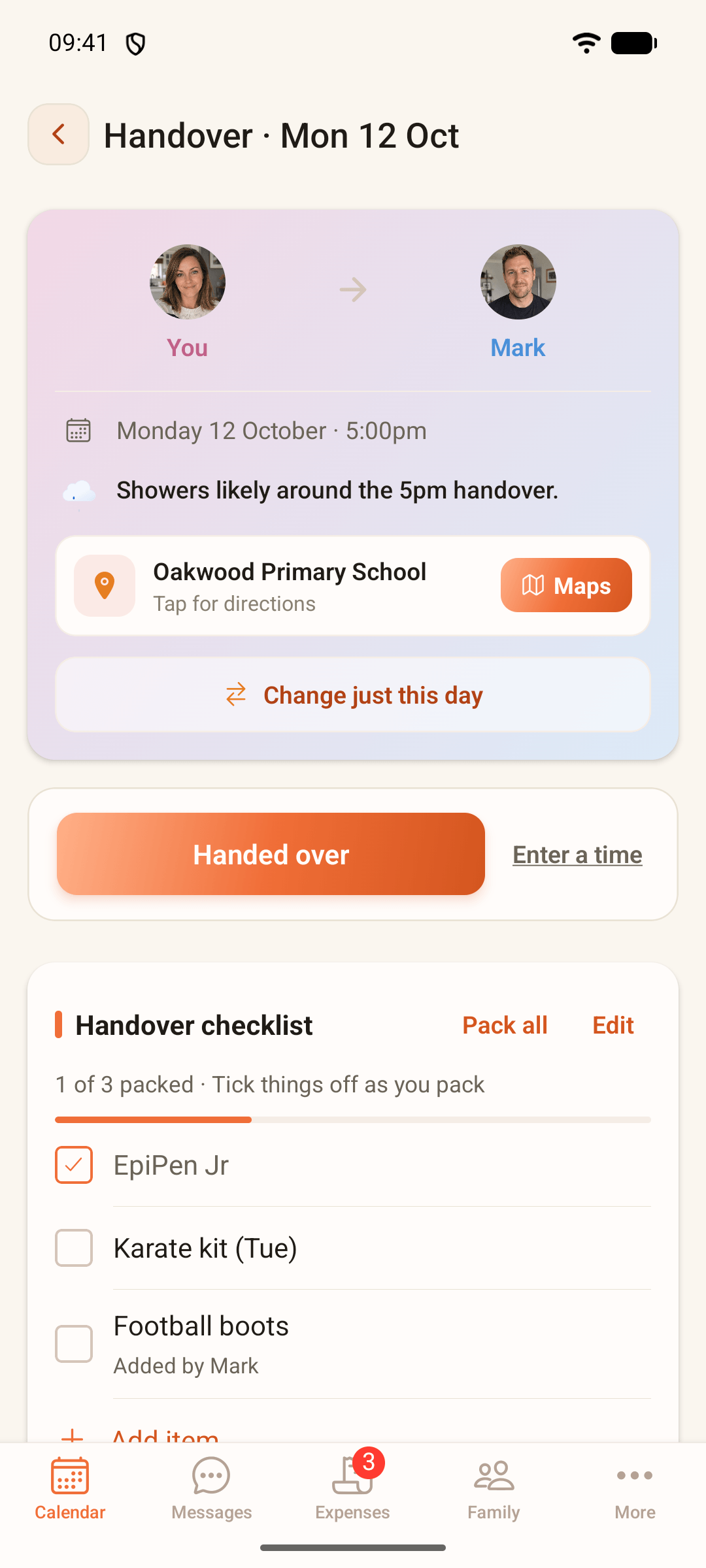
A handover on the Thompson demo family's phone, on the day. What you record with Handed over is private: only you can see it.
How it works
How a handover works in ParentGlow.
-
Set the usual handover once
When you set up the schedule, add the usual time and place for each day, with different times for term time and the school holidays if you need them. Choose who moves the children, and if someone else usually does it, such as a grandparent, add them as an optional delegate. Your co-parent sees their name when they review the schedule.
-
See what’s next, weather included
The calendar keeps the next handover in view. Once a time is agreed and the handover is three days away or less, it shows a short forecast for it, from Met Office data. Tap it for everything about that handover in one place.
-
Pack with the checklist
Either of you adds what needs to travel: school bag, medicine, PE kit. The app suggests things from the children’s medicines and clubs, and you can star what always goes. The parent handing over ticks things off as they pack.
-
Sort the details in its thread
Each handover has its own messages, with read receipts. Write one late at night and it’s posted straight away, but your co-parent’s notification waits until 8am.
-
Move just this one
Tap Change just this day to propose a different time or place, with a short note if you like. Nothing changes unless your co-parent accepts.
-
Tap Handed over when it happens
One tap notes the time, and you have five seconds to undo it. Missed the moment? Use Enter a time, from midnight on the day until 48 hours after the handover. If it didn’t happen, you can record that too, with a private note.
What happens when
What happens when…
| When… | What you do | What your co-parent sees |
|---|---|---|
| One handover needs to move | Tap Change just this day and propose a new time or place, before the handover. | The proposal and your note. Nothing changes unless they accept it. |
| A grandparent usually does the handover | Add them as the delegate when you set up or change the schedule. | Their name, when they review the schedule. |
| Something needs to go in the bag | Add it to the checklist. The parent handing over ticks it off as they pack. | The same list, and what’s been packed so far. |
| Something gets left behind | Tap Forgot something? after the handover and pick what should come back. | It goes on their next handover to you, marked Coming back. |
| The handover runs 40 minutes late | Tap Handed over when it happens, or enter the real time within 48 hours. | Nothing. They can’t see your entry, or tell whether you made one. |
| A handover doesn’t happen | Tap Didn’t happen? and add a private note if you want to. It can’t be changed afterwards. | Nothing. It’s in your private record, not theirs. |
| The handover is over | Nothing to do. The checklist closes at the handover time, and the thread becomes read-only 12 hours later. | The same record as you. Messages are kept for good. |
Who sees what
Who sees what.
The handover is shared. What you record about it isn’t.
You
- Sees: The time, place and who’s moving the children
- Sees: The handover’s messages, with read receipts
- Sees: The checklist, and what’s been packed
- Sees: Your own private handover record
- Does not see: Your co-parent’s private handover record
Your co-parent
- Sees: The same time, place and direction
- Sees: The same messages and checklist
- Sees: Their own private handover record
- Does not see: Your private record, or whether you’ve made one
A shared export or court-ready record
- Sees: Handover messages and the checklist, as part of the shared record
- Does not see: Anyone’s private handover record
From More, you can download your own private handover record (drop-off times, private notes and missed handovers) as a PDF or CSV, up to 12 months at a time. It says the entries were made by you and weren’t checked by ParentGlow, shows which were tapped at the time and which were entered later, and never includes your co-parent’s entries.
Fair to both of you
Built so neither of you can rewrite it.
-
Private means private
What you record at a handover is yours alone. ParentGlow never shows it to your co-parent or sets it against theirs.
-
No quiet edits
Messages can’t be edited or deleted, and a time you record can’t be changed once it’s saved, so neither of you can rewrite what happened.
-
Changes need a yes
A one-off change to a handover’s time or place only happens when the other parent accepts it.
-
The same tools for both
Either of you can add to the checklist, tap Handed over and keep a private record. Whoever is handing over does the packing.
The honest limits
What handovers in ParentGlow don’t do.
-
They don’t decide who’s right
Your private record is your own note. ParentGlow doesn’t check it, and your download says so.
-
They don’t give a helper access
Naming a delegate doesn’t give them an account or notifications. It’s a name on the schedule.
-
They don’t replace a court order
If a court order sets out how handovers happen, follow it. ParentGlow holds the arrangement; it doesn’t change what’s been ordered.
If handovers don’t feel safe
If meeting at all feels unsafe, a handover can happen with no contact: at school, through a trusted person, or through a child contact centre’s handover service. ParentGlow can hold the plan, but it can’t keep anyone safe on the day.
Common questions
Handover questions, answered from the app.
Can a grandparent do the handover?
Yes. When you set up the schedule you can add an optional delegate: someone who isn't a parent and usually carries out the handover, such as a grandparent. Your co-parent sees their name when they review the schedule. The delegate doesn't get an account or notifications.
Can my co-parent see when I tap Handed over?
No. What you record at a handover, the time, any private notes and any missed handover, is visible only to you. Your co-parent can't see it, and can't tell whether you've recorded anything.
What if I tap Handed over by mistake?
You have five seconds to undo it, or ten with a screen reader, and nothing is saved until then. If you tap well before or after the scheduled time, the app asks when it actually happened. Once saved, the time is permanent and can't be changed.
How long do I have to record a handover?
From midnight, UK time, on the day of the handover until 48 hours after its scheduled time. If you missed the moment, use Enter a time.
Do private handover records go into a shared export?
No. They aren't included in any shared export or court-ready record. You can download your own as a PDF or CSV, and the download says the entries were made by you and weren't checked by ParentGlow.
What if one handover needs to move?
Tap Change just this day on that handover and propose a new time or place, with a short note if you like. Nothing changes unless your co-parent accepts it.
What if something is left at the other house?
After the handover, the parent who has the children can tap Forgot something? and pick what should come back. It goes on the next handover the same way, marked Coming back, so it's on the list before anyone packs.
Can handover messages be deleted?
No. Handover messages are permanent and timestamped, with read receipts, so you both have one record of what was said.
Look closer
More that's built in, quietly.
Quiet hours
Pick the hours ParentGlow stays quiet. Messages still arrive, nothing is blocked, and your co-parent never sees your hours.
See how it worksSitter links
Send a babysitter or grandparent a read-only page of the essentials: no login, allergies always shown, and it expires on its own.
See how it worksSchool holidays
Plan every half term and holiday across two homes on council term dates: shared how you choose, repeating year to year, and agreed by both of you.
See how it worksTone Guard
An AI check that flags heated wording as you type, with a calmer version one tap away. It never stops you sending a message. A flagged proposal note keeps its Tone Guard result with the note.
See how it worksShared calendar & handovers
The shared calendar both homes trust, with the next handover always in view.
Back to shared calendar & handoversBring the calm home.
Early access is rolling out across the UK now. A hello, the odd update, and one email when it's your turn.
Almost there. Check your email and tap the link to confirm.
Free during early access · one plan covers both parents · unsubscribe anytime