

Early access
Bring the calm home.
One plan covers both homes. A hello, the odd update, and one email when it's your turn.
Almost there. Check your email and tap the link to confirm. 
Free during early access · one plan covers both parents · unsubscribe anytime
Evenings that stay yours.
Choose the hours when ParentGlow keeps quiet. In that time you won't be pinged about your co-parent's messages or handover changes. Nothing is blocked or deleted, and your co-parent can't see your hours.
- Your hours, your choice
- Messages still arrive in the app
- Rescue-medicine reminders still come through
Checked against the app on
The short answer
Can I stop my co-parent's messages pinging me at night without blocking them?
Yes. In ParentGlow you set quiet hours, a start and an end time, under More → Notifications. During those hours the app sends you no notifications for new messages, handover changes or schedule proposals. Everything still arrives in the app, nothing is blocked, and your co-parent can't see the hours you've chosen.
-
Your own hours
Each parent sets their own. One of you can’t set them for the other.
-
Skipped, not stored up
Message and change notifications in your quiet hours aren’t sent later, so there’s no morning flood.
-
Rescue medicine still rings
Severe-allergy and rescue medication reminders come through regardless.
-
Just for you
Your co-parent isn’t shown your quiet hours, and isn’t told when a message lands in them.
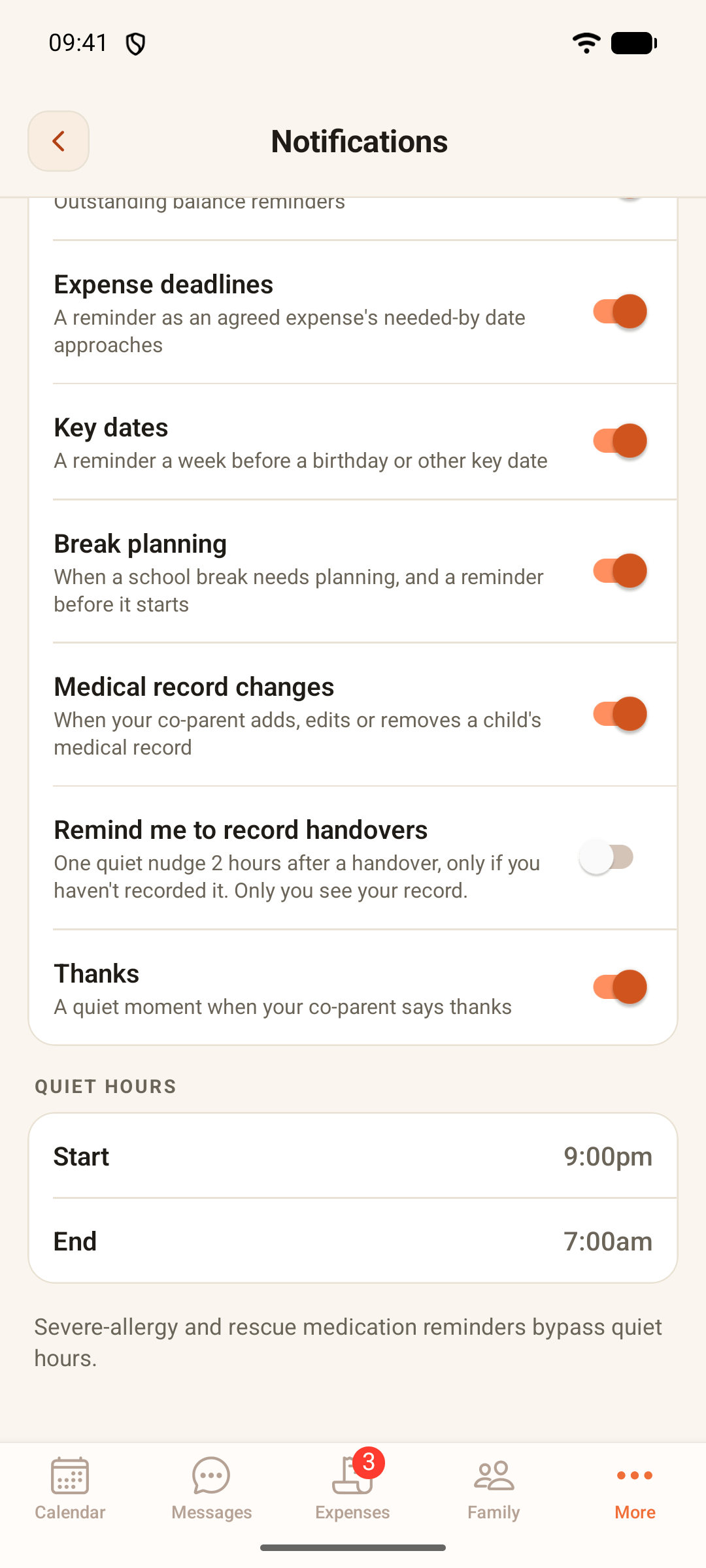
Quiet hours on the Thompson demo family's phone: 9pm to 7am, nothing blocked.
How it works
Set it once, in a minute.
-
Open More, then Notifications
It’s the row that says “Reminders, alerts and quiet hours”.
-
Pick a start and an end
Tap Start and End and choose your times, such as 9pm to 7am. Quiet hours can run past midnight.
-
Choose what you hear about at all
On the same screen, switch whole kinds of notification on or off: medication reminders, handover changes, settle-up nudges, expense deadlines, key dates, break planning, medical record changes and thanks.
-
Catch up when you’re ready
Anything sent in your quiet hours is waiting in the app the next time you open it.
What happens when
What happens during your quiet hours.
| When this happens in your quiet hours | What you get | Good to know |
|---|---|---|
| Your co-parent sends a message | No notification. It’s in Messages when you next open the app. | They aren’t told about your quiet hours. The message keeps its real time in the record. |
| A change to a handover or the schedule is proposed | No notification. The proposal waits in the app for your answer. | Nothing changes on the calendar until it’s agreed. |
| A medication reminder is due | It still arrives, so a dose isn’t missed. | On iPhone it comes without a sound. On Android, your phone’s notification settings decide. |
| A severe-allergy or rescue medicine reminder is due | It comes through as normal, with sound. | Your phone’s own Do Not Disturb setting still applies. |
| A key-date or expense-deadline reminder is due | It arrives as usual. Quiet hours don’t apply to these daily reminders. | They’re never sent before 8am. |
| Your co-parent leaves ParentGlow | You’re told straight away. | A few account notices like this always come through. |
| Your quiet hours end | Nothing extra arrives. | Skipped message and change notifications aren’t sent later. Open the app to catch up. |
Fair to both of you
The same rules for both of you.
-
Each of you chooses your own
Quiet hours belong to the parent who sets them. Your co-parent can set theirs too, and they work exactly the same way.
-
Nothing is hidden from the record
A message sent at 11pm still sits in the timeline with its real time on it. Quiet hours change when you’re told, not what’s kept.
-
Nobody is told
Your co-parent isn’t shown your hours, and nothing tells them a message arrived during them. There’s nothing to argue about.
-
Messaging is never switched off
Either of you can still send at any time. Quiet hours only decide whether a phone is pinged.
The honest limits
What quiet hours don’t do.
-
They don’t block or delay messages
Messages arrive in the app straight away. You just aren’t pinged about them.
-
They don’t save the pings for later
When quiet hours end you won’t get a pile of catch-up notifications. Open the app to see what came in.
-
There’s no “urgent” button that breaks through
Nobody can send a message that rings through your quiet hours. For anything urgent, phone. In an emergency, call 999.
-
They don’t change your phone’s settings
If your phone’s Do Not Disturb is on, that still applies, including to rescue-medicine reminders. Calls and texts from outside ParentGlow aren’t affected either.
When quiet hours aren’t the answer
Quiet hours make evenings calmer. They aren’t protection. If your co-parent’s messages feel threatening, controlling or relentless, that isn’t something a notification setting should have to fix, and you don’t have to handle it alone.
Block, mute or quiet hours?
Blocking isn’t the only option.
Parents often ask whether they can simply block their ex. When you share children, here’s how the three usual choices compare.
| What you need | Block their number | Mute the chat on your phone | ParentGlow quiet hours |
|---|---|---|---|
| Messages about the children still reach you | No | Yes | Yes, in the app |
| Quiet only at the times you choose | No, it’s all or nothing | Only if your phone lets you schedule it | Yes, at the same times every day |
| Your co-parent is told | They may notice | No | No |
| One dated record of what was said, for both of you | No | Only what’s on your own phone | Yes, the same permanent record for both |
Blocking and muting describe typical phone settings, which vary from phone to phone. This is general information, not legal advice: if a court order says how you should stay in touch, follow it.
Common questions
Quiet hours, answered honestly.
Can I block my ex if we have a child?
On your own phone, you can block any number. The trouble is that arrangements for the children still need a way to reach you, and if there's a court order, it may say how you should keep in touch. Quiet hours are a middle way: your co-parent can still message you in ParentGlow, and you simply aren't pinged during the hours you choose.
Will I miss something urgent?
Messages still arrive in the app during quiet hours; you just aren't notified. There's no way for anyone to send a message that rings through, so for anything urgent, phone, and in an emergency call 999. Severe-allergy and rescue medication reminders do still come through.
Can my co-parent see my quiet hours?
No. Only you can see or change your quiet hours. Your co-parent isn't told you have them, and nothing tells them a message arrived during them.
What happens to notifications during quiet hours?
Notifications for messages, handover changes and proposals are skipped, not saved up, so nothing extra arrives when quiet hours end. Medication reminders still arrive; severe-allergy and rescue medicine reminders come through with sound as normal.
Do medication reminders make a sound during quiet hours?
Severe-allergy and rescue medicine reminders do, as normal. Other medication reminders still arrive, and ParentGlow sends them without a sound. On iPhone they arrive silently; on Android, your phone's own notification settings decide.
Do quiet hours follow British Summer Time?
Yes. Quiet hours follow the UK clock all year, so 10pm to 7am means 10pm to 7am whether the clocks are on GMT or British Summer Time.
Can both parents set quiet hours?
Yes. Each parent sets their own, under More, then Notifications, and they work the same way for both of you.
Is it free?
Quiet hours are part of ParentGlow, which is free during early access. At launch it's £5.99 a month, one plan covers both parents, and exporting your data is always free.
Look closer
More that's built in, quietly.
Handovers
Time, place and the weather from your schedule, a checklist for what travels, a thread for every handover, and one tap to note privately when it happened.
See how it worksSitter links
Send a babysitter or grandparent a read-only page of the essentials: no login, allergies always shown, and it expires on its own.
See how it worksSchool holidays
Plan every half term and holiday across two homes on council term dates: shared how you choose, repeating year to year, and agreed by both of you.
See how it worksTone Guard
An AI check that flags heated wording as you type, with a calmer version one tap away. It never stops you sending a message. A flagged proposal note keeps its Tone Guard result with the note.
See how it worksCalm messaging
The rest of calm messaging: permanent, timestamped messages with read receipts.
Back to calm messagingBring the calm home.
Early access is rolling out across the UK now. A hello, the odd update, and one email when it's your turn.
Almost there. Check your email and tap the link to confirm.
Free during early access · one plan covers both parents · unsubscribe anytime