

Everything the sitter needs, for one evening.

Send a babysitter or grandparent a read-only link with your children's allergies and medicines, plus the routines and contacts you choose. They don't need an account or the app, and the link stops working at the end time you set.

  • No account or app for the sitter
  • Allergies and medicines always shown
  • Stops working on its own

Checked against the app on

The short answer

How can I share my child's allergies, medicines and routine with a babysitter?

With a sitter link. In ParentGlow you pick the children and a time window, choose what to include, and send the link from your phone. The sitter opens a simple read-only page with no login. Allergies and medicines are always on it, the rest only if you switch it on, and it stops working at the end time.

  • No login for the sitter

    It opens as a web page in any browser. No account, no app.

  • Always the essentials

    Allergies and medicines are always shown, and can’t be switched off.

  • Only what you choose

    Bedtime, food, comforts, contacts, photos and school notes are each your call.

  • Gone when the evening ends

    It works from the start time to the end time, then stops. You can end it early.

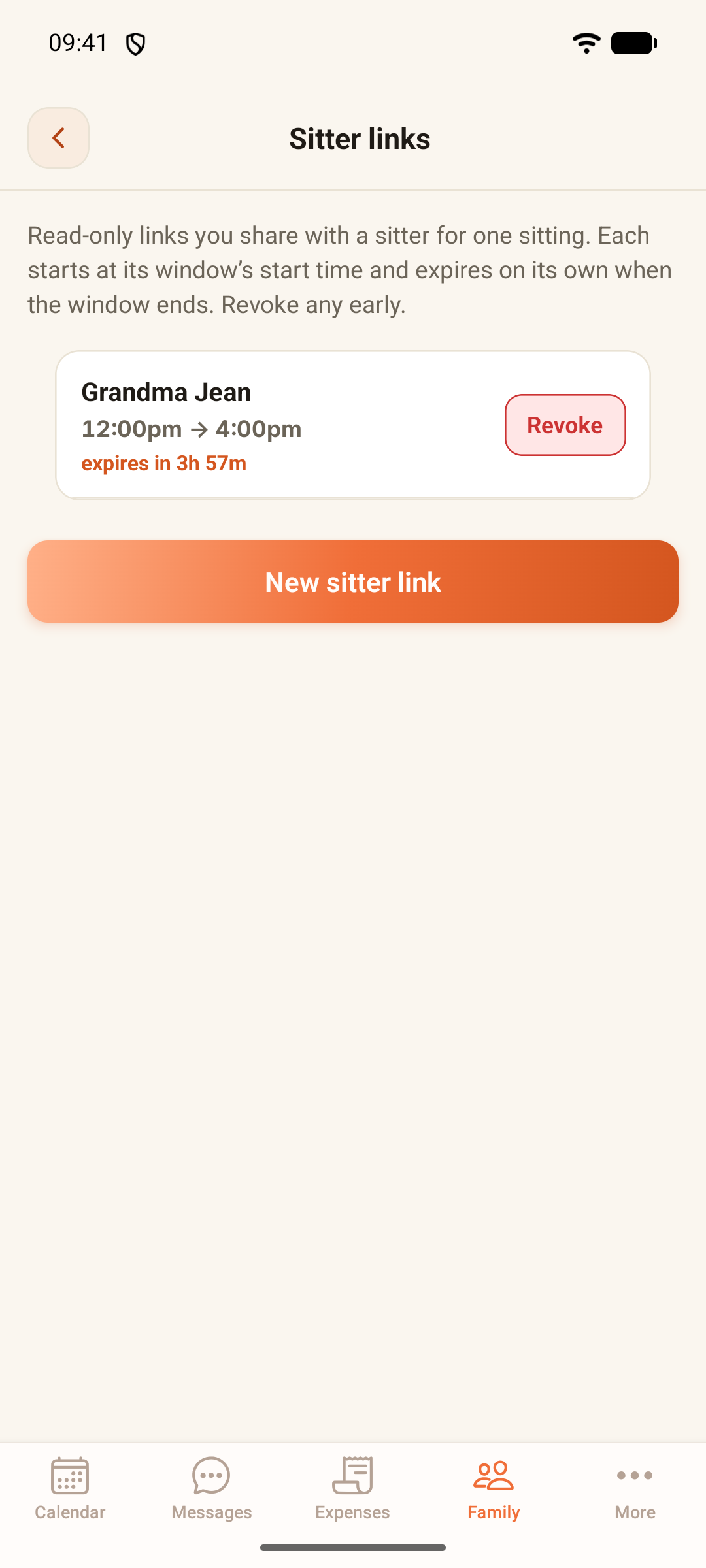
ParentGlow's Sitter links screen with one live link for Grandma Jean, running 12:00pm to 4:00pm and expiring in 3 hours 57 minutes, with a Revoke button beside it and a New sitter link button below.

A live sitter link on the Thompson demo family's phone: who it's for, when it runs, and a button to end it early.

How it works

Send one in a minute.

  1. Open Family, then Sitter links

    Tap New sitter link and add the sitter’s name and phone number.

  2. Choose the children and the time

    Pick one child or several. The window starts at the next half hour and runs for four hours, unless you change it.

  3. Choose what they’ll see

    Allergies and medicines are always included. Then switch on any of bedtime routine, food rules, comforts, your shared emergency contacts, child photos, and school and pickup info. Photos only appear if you’ve marked them as shareable with sitters.

  4. Send it your usual way

    Share the link from your phone, by text or in a messaging app. You can share the children’s Emergency Cards at the same time.

  5. Let it expire

    The page works between the start and end times, then says the link has expired. Either parent can revoke it early from the Family page.

What happens when

What happens when…

What happens with a sitter link in common situations
When…What happensGood to know
The sitter opens the link A simple page of tonight’s essentials. No login, no app. It’s read-only. Nothing in your family record can be changed from it.
The evening ends The link stops working at the end time and says it has expired. Need them again next week? Send a new link.
Plans change and the sitter isn’t needed Revoke the link from the Family page. It stops working straight away.
The link gets forwarded Anyone with the link can open it until it ends. That’s why it only shows what you switch on, and why it expires.
A document should go too, like a GP letter Mark that document as shareable with sitters. Only the parent who uploaded a document can change this. It’s off unless they switch it on.
Your co-parent checks the family’s links They see the link, who it’s for and when it runs. Neither of you is notified when the sitter opens it.

Who sees what

Who sees what.

A sitter link shows the minimum a caring adult needs, and nothing more.

The sitter

  • Sees: Your children’s first names
  • Sees: Allergies and medicines, always
  • Sees: The routines, shared contacts and school notes you switched on, and photos marked for sitters
  • Sees: Documents marked as shareable with sitters
  • Does not see: NHS numbers, the care log, surnames or the rest of your family record
  • Does not see: Anything at all before the start time or after the end time

Your co-parent

  • Sees: That the link exists, who it’s for and when it runs
  • Sees: The same power to revoke it early
  • Does not see: A notification when the sitter opens it

Fair to both of you

No side doors between two homes.

  • Both parents can see it

    A sitter link isn’t a secret. Either parent can see the family’s live links, who they’re for and when they run, and either can end one early.

  • Your documents, your call

    Only the parent who uploaded a document can make it visible to sitters, and it starts switched off.

  • Kept to the minimum

    First names only. No surnames, no NHS number, and nothing from the care log.

The honest limits

What a sitter link doesn’t do.

  • It isn’t an account

    The sitter can’t log in, change anything, or see the family’s messages, calendar or expenses.

  • It doesn’t check who opens it

    Anyone who has the link can open it until it ends, so send it only to the person looking after the children.

  • It doesn’t tell you when it’s opened

    There’s no notification for either parent when the sitter looks at the page.

  • It doesn’t send itself

    You send it from your phone. ParentGlow doesn’t text or email the sitter.

  • It isn’t the Emergency Card

    The Emergency Card is a separate printable A4 card for each child. You can share it alongside a sitter link.

When a link isn’t the right tool

For a nursery, a childminder or an after-school club, use their own forms and do what they ask for. A sitter link is for an evening or a weekend with someone you already trust.

Free to print

Prefer paper too? Print a babysitter sheet.

A blank sheet with the things a sitter or grandparent needs, for the fridge door or the kitchen drawer. You fill it in by hand, so nothing on it goes online, and it's free with or without the app.

Prints on one A4 page. Nothing is saved or sent.

Babysitter information sheet

For · Filled in on

In an emergency, call 999. Give this address:

About the child

Name and age
Allergies — and what to do
Medicines — name, dose and when
Health things to know (inhaler, eczema cream…)

The evening

Food and drinks — what's fine, what's not
Bedtime and the routine that helps
Screens, games and house rules
Comforters and what helps them settle

Who to call

Parent tonight — name and number
Other parent — name and number (if they should be called)
Another trusted adult — name and number
GP surgery — name and number

The house

Wi-Fi name and password
Spare key, heating and lights
Ways out, and where the first-aid kit is
Anything else
Free from parentglow.co.uk. Keep it somewhere the sitter can find it, and update it when something changes.

Common questions

Sitter link questions, answered plainly.

Does the babysitter or grandparent need the app?

No. A sitter link opens as a simple web page in any browser, with no account and no login. It works for anyone looking after the children for a while: a babysitter, a grandparent or a friend.

What does the sitter see?

Your children's first names and their allergies and medicines, which are always included. Then anything you switch on: bedtime routine, food rules, comforts, your shared emergency contacts, and school and pickup info. Photos and documents appear only if they've been marked as shareable with sitters.

How long does a sitter link last?

You choose the start and the end. By default it starts at the next half hour and lasts four hours. Outside that window, the page just says the link has expired.

Can I cancel a sitter link early?

Yes. Either parent can revoke it from the Family page, and it stops working straight away.

What if the link gets forwarded?

Anyone with the link can open it until it ends, so only send it to the person looking after the children. It's read-only, it shows only what you've switched on, and it expires on its own.

Can my co-parent see that I made a sitter link?

Yes. Both parents can see the family's live sitter links, who they're for and when they run. Neither of you is notified when the sitter opens one.

Will the sitter see my child's NHS number?

No. NHS numbers, the care log, surnames and the rest of your family record never appear on a sitter page.

Is there a printable babysitter information sheet?

Yes. This page has a free sheet you can print and fill in by hand, for the fridge door or the grandparents' kitchen drawer. A sitter link is the version that stays up to date and expires on its own.

Is it free?

Sitter links are part of ParentGlow, which is free during early access. At launch it's £5.99 a month, one plan covers both parents, and exporting your data is always free. The printable sheet is free for anyone.

Bring the calm home.

Early access is rolling out across the UK now. A hello, the odd update, and one email when it's your turn.

Free during early access
£5.99/mo at launch · covers both homes
Always free to export your data
What brings you here? (optional)

Free during early access · one plan covers both parents · unsubscribe anytime