

Early access
Bring the calm home.
One plan covers both homes. A hello, the odd update, and one email when it's your turn.
Almost there. Check your email and tap the link to confirm. 
Free during early access · one plan covers both parents · unsubscribe anytime
School holidays, planned for both homes.
Half terms, Christmas, Easter and the summer, laid out from council term dates. Choose how each break is shared, set it to repeat each year, and once you're both in the app, nothing changes on the other parent's calendar until they agree.
- Council term dates built in
- Repeats year to year
- Changes need both of you
Checked against the app on
The short answer
Is there an app for planning school holidays between two homes?
Yes. ParentGlow lays out each half term and holiday from council term dates, found from your child's school postcode. For each break you choose how it's shared, such as taking turns or splitting it in half, and whether that repeats every year. Once you're both in the app, changing days needs the other parent's agreement.
-
Council term dates built in
Term dates for councils across England, Scotland, Wales and Northern Ireland, from the same dataset as our free term-dates pages.
-
Your arrangement, per break
Take turns, split it, keep the weekly pattern running, or agree each one as it comes.
-
Set once, repeats each year
A break can repeat year to year, and you can see the next two before you commit.
-
Nothing changes without a yes
Changing days needs the other parent’s agreement. No reply means the current plan stays.
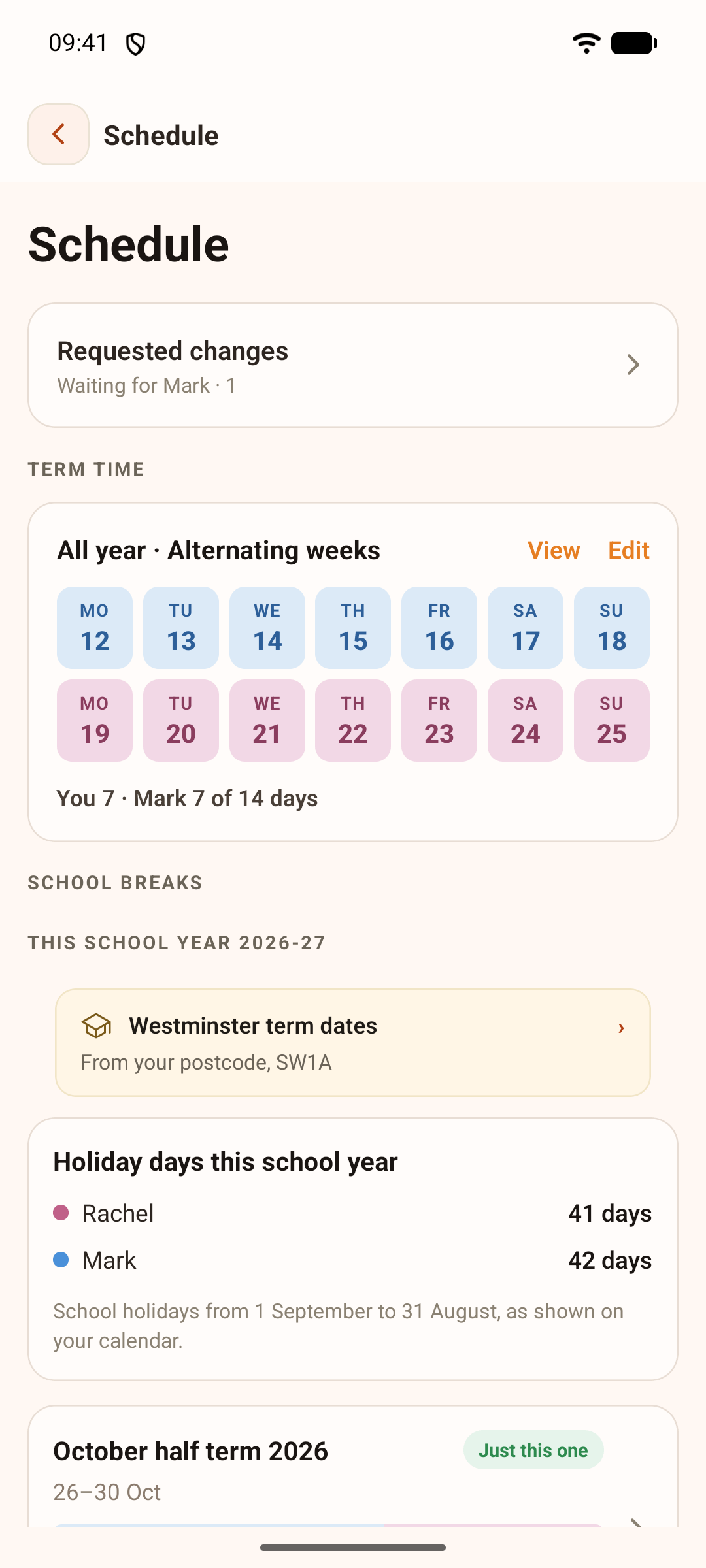
The 2026-27 school year on the Thompson demo family's phone.
How it works
How the holidays come together.
-
Tell it where each child goes to school
Add each child’s school postcode and the app finds that council’s term dates. For a private school, you add the dates yourself.
-
Open Schedule, then School breaks
Each half term and holiday is there with its dates, ready to plan.
-
Choose how the break is shared
Pick the whole break, split in half, or week on week off, or paint the days yourself. Add the handover time and place wherever the children change homes.
-
Decide whether it repeats
Take turns each year, keep the same shape, keep the weekly pattern running, or agree each one. Christmas can be split into Christmas week and New Year week, swapping each year.
-
Send it for a yes
Once your co-parent is in the app, your plan goes to them to approve or decline. Until they answer, the current plan stays.
What happens when
What happens when…
| When… | What happens | Good to know |
|---|---|---|
| Your children go to schools in different council areas | Each child keeps their own term dates, shown as separate ribbons on the calendar. | You can see at a glance where a half term doesn’t line up. |
| You want to swap part of the summer | Paint the days you want to change and send the plan to your co-parent. | Their calendar only changes if they approve it. |
| Your co-parent doesn’t reply | The current plan stays. | Every proposal has a respond-by time. No response means the current schedule continues. |
| They decline | The existing plan stays, and you can suggest an alternative. | Nothing is sent until you choose to send it. |
| Your council hasn’t published next year’s dates | The app works from an estimate for your country until they’re in. | Our free term-dates pages list the councils we publish. |
| Your co-parent isn’t in the app yet | Your plan applies straight away, just for you. | Once they join, changes go to them for a yes. |
Fair to both of you
Both of you, or it doesn’t change.
-
A change is a proposal
Once you’re both in the app, changing the holidays means sending a proposal. It only happens when the other parent approves it.
-
Silence isn’t a yes
If there’s no reply by the respond-by time, the current plan simply continues.
-
One set of dates for both homes
You both plan from the same council term dates, so nobody is working from last year’s letter home.
-
Every child counted
Children at different schools each keep their own term dates, so no one’s holiday gets missed.
The honest limits
What the holiday planner doesn’t do.
-
It doesn’t decide what’s fair
It gives you the options and keeps what you agree. It doesn’t choose an arrangement for you or judge one.
-
It doesn’t read court orders
If a court order sets out the holidays, follow it. You can plan the arrangement in the app, but the app doesn’t read the order.
-
It can’t know dates nobody has published
Until your council’s dates are in, the app works from an estimate for your country. For a private school, you add the dates yourself.
-
It doesn’t change a plan behind anyone’s back
Once you’re both in the app, there’s no way to change the other parent’s days without their approval.
When a planner isn’t enough
If you can’t agree the holidays at all, a planner won’t settle it. Mediation can help you reach an arrangement, and our guide to splitting the school holidays walks through the common patterns and what to write down.
Free planner or the app?
Try it free. Keep it in the app.
Our free school holiday planner works out a year from council dates in seconds, with no sign-up. The app is where the plan lives, for both of you.
| What you need | Free planner on this site | In the ParentGlow app |
|---|---|---|
| Council term dates built in | Yes, for one or two councils | Yes, from each child’s school postcode |
| Ways to share each break | Alternate or split, break by break | Take turns, split, week on week off, keep the pattern, agree each one, or paint any days |
| Your co-parent agrees to it | No, it’s a calculation you can share | Yes, every change needs their approval |
| Repeats year to year | One year at a time | Yes, with the next two breaks previewed |
| Handovers | The handover days, listed | The time and place for each change of home |
| Account needed | No, and nothing is stored | Yes, one plan covers both parents |
Both use the same council term-dates dataset. The free planner is a scheduling aid, not legal advice.
Common questions
School holiday questions, answered from the app.
How does the app know our school term dates?
Add each child's school postcode and the app finds that council's term dates. Until a council's dates are published, it works from an estimate for your country, and for a private school you add the dates yourself.
Can we take turns at Christmas?
Yes. You can take turns having the whole break, or split it so one of you has Christmas week and the other New Year week, swapping each year. You can also keep the same shape every year, or agree each Christmas as it comes.
Can we split the summer holidays?
Yes. Options include week on, week off; two weeks each, taking turns; splitting it in half; or keeping the weekly pattern running. You can also paint the exact days yourself.
What happens if my co-parent doesn't reply?
Nothing changes. Every proposal has a respond-by time, and if there's no answer, the current schedule continues.
Our children go to schools in different council areas. Does that work?
Yes. Each child keeps their own term dates, shown as separate ribbons on the calendar, so you can see where half terms don't line up.
Is the free planner on this site the same thing?
It uses the same council term dates. The free planner works out a year in seconds and stores nothing. The app is where you both agree the plan, repeat it each year and keep it.
Does the app decide what is fair?
No. It gives you the options and keeps what you both agree. If a court order sets out the holidays, follow the order.
Is it free?
The holiday planner is part of ParentGlow, which is free during early access. At launch it's £5.99 a month, one plan covers both parents, and exporting your data is always free. The planner on this site is free for anyone.
Look closer
More that's built in, quietly.
Quiet hours
Pick the hours ParentGlow stays quiet. Messages still arrive, nothing is blocked, and your co-parent never sees your hours.
See how it worksHandovers
Time, place and the weather from your schedule, a checklist for what travels, a thread for every handover, and one tap to note privately when it happened.
See how it worksSitter links
Send a babysitter or grandparent a read-only page of the essentials: no login, allergies always shown, and it expires on its own.
See how it worksTone Guard
An AI check that flags heated wording as you type, with a calmer version one tap away. It never stops you sending a message. A flagged proposal note keeps its Tone Guard result with the note.
See how it worksShared calendar & handovers
The shared calendar both homes trust, with school terms already in.
Back to shared calendar & handoversBring the calm home.
Early access is rolling out across the UK now. A hello, the odd update, and one email when it's your turn.
Almost there. Check your email and tap the link to confirm.
Free during early access · one plan covers both parents · unsubscribe anytime